What Is Grade Roll in Banner? From Final Grades to Academic History
Grade roll moves final grades from registration records into permanent academic history in Banner. How the process works, what it updates and common errors.
What is grade roll in Banner?
Grade roll is the Banner process that copies final grades from a term's registration records into permanent academic history. Faculty enter final grades in Self-Service (or they arrive from the LMS), the registrar runs the grade roll process (SHRROLL), and Banner creates academic history course and grade records, after which GPAs and academic standing can be calculated.
Overview
During term, grades live with registration records. After term, they need to become academic history, the permanent record used for transcripts and GPA. Grade roll is the bridge.
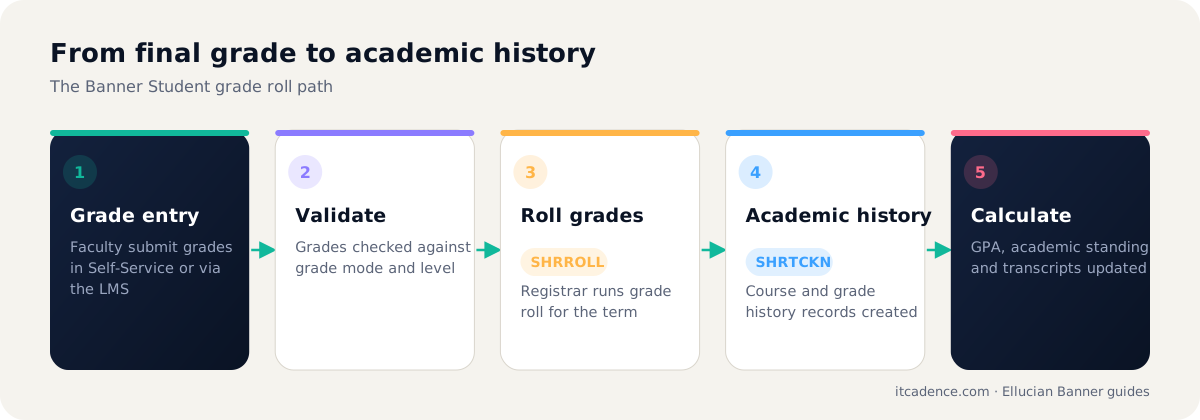
Step by step
- Grade entry: faculty submit final grades in Self-Service, or via LMS integration such as ILP.
- Validation: grades must be valid for the course's grade mode and level.
- Roll: the registrar runs SHRROLL for the term, by section or for the whole term.
- Academic history: Banner creates course history (
SHRTCKN) and grade (SHRTCKG) records. - Calculations: term and cumulative GPAs, academic standing and similar processes run afterwards.
Common problems
| Problem | Typical cause |
|---|---|
| Section skipped | Not all grades submitted, or excluded by parameters |
| Grade rejected | Grade not valid for the student's grade mode |
| GPA looks wrong | Repeat rules or grade quality points need review |
| Transcript missing course | Roll not run, or roll failed for that student |
Tip: Schedule grade roll as a monitored job submission run and review the output in GJIREVO before telling the registrar it is complete.
Frequently asked questions
Yes. After roll, grade changes are made in academic history with an audit trail, rather than in the registration record.
Common reasons include a missing or invalid final grade, a grade mode problem, or the section not being included in the roll parameters.
Last reviewed by the ITCadence Banner team. Ellucian product capabilities vary by version and licence; confirm details against current Ellucian documentation.