How Does Banner Job Submission Work? GJAPCTL and GJIREVO Explained
Banner runs reports and batch processes through Job Submission. How to submit a job on GJAPCTL, use saved parameter sets, review output in GJIREVO and fix failed jobs.
How does Banner Job Submission work?
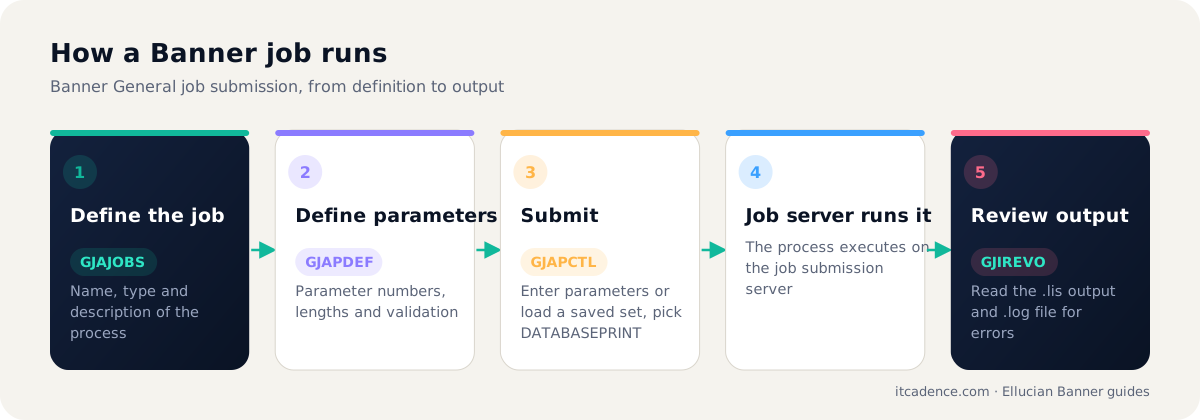
Banner Job Submission is the framework for running Banner reports and batch processes. Jobs are defined on GJAJOBS and their parameters on GJAPDEF. A user submits a job on GJAPCTL by entering the process name, choosing a printer (often DATABASEPRINT), entering or loading saved parameters and submitting. The job runs on the job submission server, and the output and log files can be reviewed on GJIREVO.
Overview
Most Banner batch work, from grade roll to payroll to fee assessment, runs through Job Submission. Understanding four pages covers almost everything.
The four key pages
| Page | Purpose |
|---|---|
GJAJOBS | Defines a job: name, type (C, Pro*C, COBOL, SQL*Plus, shell) and description |
GJAPDEF | Defines the job's parameters, lengths and validation |
GJAPCTL | Submits a job with parameters and printer choice |
GJIREVO | Reviews output (.lis) and log (.log) files |
Submitting a job on GJAPCTL
- Enter the process name, for example
SHRROLL. - Choose a printer:
DATABASEPRINTlets you view output online. - Enter parameter values, or load a saved parameter set.
- Choose whether to run in audit or update mode if the job supports it.
- Submit and note the one-up number.
Reviewing output on GJIREVO
Select the job and one-up number to see the .lis and .log files. Always read the log for errors, even when output looks complete.
Why jobs fail
- Job submission server not running or misconfigured.
- Invalid parameters or a required one left blank.
- Directory or permission problems on the job server.
- Database errors such as invalid objects after an upgrade.
Tip: For critical jobs such as payroll, grade roll and fee assessment, maintain named parameter sets and a short runbook with expected record counts.
ITCadence monitors Banner batch jobs as part of managed support. Ask us how.
Frequently asked questions
A special printer destination that stores job output in the database so users can view it on GJIREVO instead of sending it to a physical printer.
Save the parameters as a parameter set on GJAPCTL, then load that set next time. This reduces errors on repeated runs.
Common causes are the job submission server not running, a missing or invalid parameter, file system permissions, or the job erroring early. Check the log file in GJIREVO.
Last reviewed by the ITCadence Banner team. Ellucian product capabilities vary by version and licence; confirm details against current Ellucian documentation.