Connecting Banner to Moodle, Canvas and Brightspace with ILP
Ellucian's Integration for Learning Platforms keeps courses, enrolments and grades in sync between Banner and your LMS. What a clean rollout looks like.
How do you roll out ILP between Banner and an LMS?
A clean ILP rollout starts with business decisions (course shell strategy and timing), then cleans identity data so people match across Banner and the LMS, pilots with one department for a full term including add/drop and grade submission, and finishes with monitoring and runbooks so sync failures are caught before students notice.
Students live in the learning management system. Registrars live in Banner. When the two disagree about who is enrolled in what, everyone feels it: students can't see their courses, instructors chase missing learners, and final grades get keyed in by hand.
Ellucian's Integration for Learning Platforms (ILP) closes that gap by synchronising Banner Student with the LMS your institution uses.
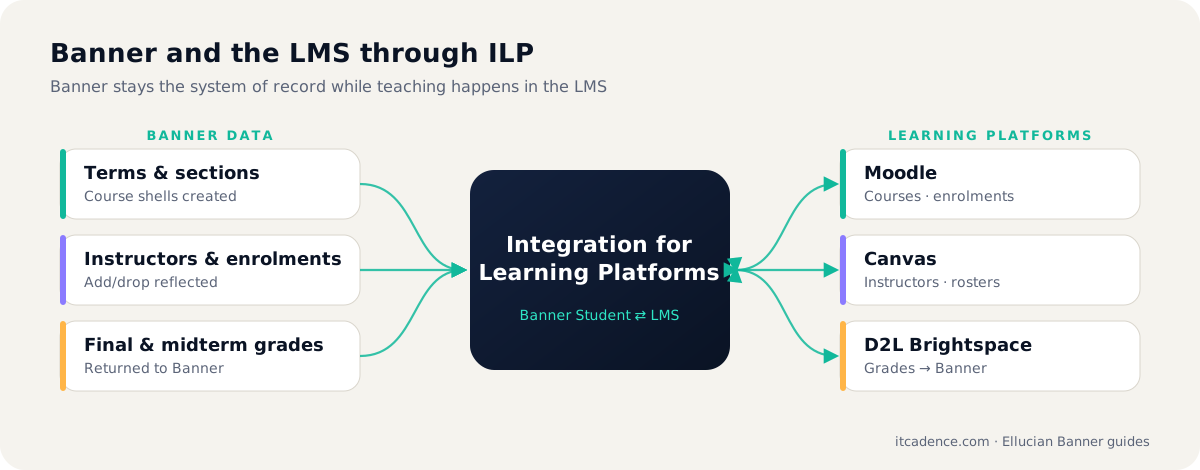
What ILP actually syncs
| Data | Direction | Why it matters |
|---|---|---|
| Terms and course sections | Banner → LMS | Course shells exist before teaching starts |
| Instructors and enrolments | Banner → LMS | Add/drop is reflected without manual uploads |
| Midterm and final grades | LMS → Banner | Instructors submit grades where they already work |
| Last date of attendance | LMS → Banner | Supports compliance and financial aid processes |
The exact features depend on your Banner version, LMS and licensing, so confirm scope against current Ellucian documentation.
Decide your course shell strategy early
The biggest design decision is not technical. Will every Banner section get its own LMS shell, or will cross-listed and multi-section courses be merged? Will shells be created when the schedule is built, or a fixed number of weeks before term? Agree this with academic leadership before configuration starts.
Clean your identity data
ILP can only match people if identities line up. Before go-live check that:
- Every student and instructor has a consistent unique identifier in both systems.
- Email addresses and usernames follow one convention.
- Legacy accounts and duplicate LMS users are merged or archived.
Note: Most "ILP isn't working" tickets we see trace back to identity mismatches, not to the integration itself.
Pilot with one department
Run a full term with one faculty, including add/drop, a midterm grade push and final grade submission. You will find edge cases (late enrolments, grade changes, incompletes) no design workshop predicted.
Plan for monitoring, not just go-live
Integrations fail quietly. Build alerts for failed messages, unmatched users and grades that did not post, and give the support team a runbook for each.
A good LMS integration is invisible. Students just see their courses, and instructors just see their students.
ITCadence designs, configures and supports Banner-to-LMS integrations end to end. Book a review of your current setup.
Frequently asked questions
Integration for Learning Platforms, Ellucian's integration between Banner and learning management systems.
Major platforms including Moodle, Canvas, Blackboard and D2L Brightspace. Confirm current support for your versions in Ellucian documentation.
Last reviewed by the ITCadence Banner team. Ellucian product capabilities vary by version and licence; confirm details against current Ellucian documentation.