How Does Payroll Processing Work in Banner HR?
A walk-through of the Banner payroll cycle, from time entry and calculation to cheques, direct deposit, update and the finance feed, with tips for a smooth run.
How does Banner payroll processing work?
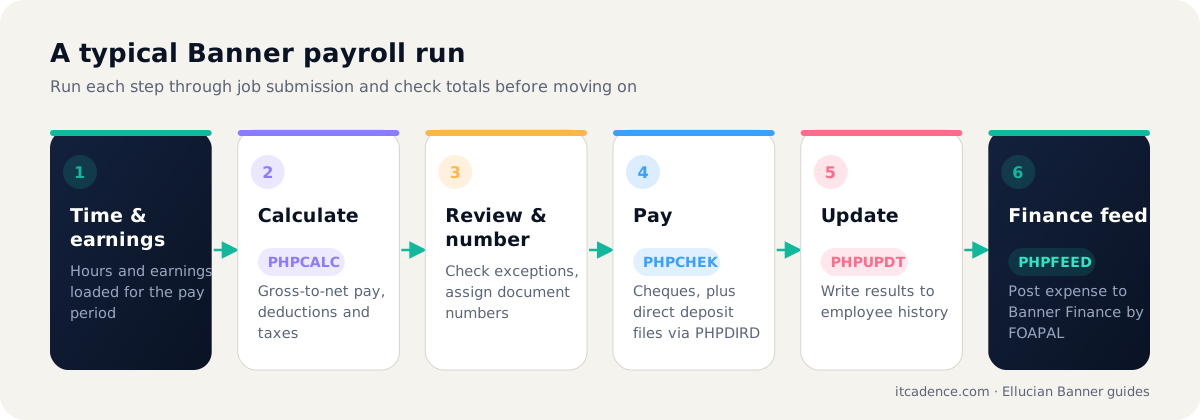
Banner payroll runs as a sequence of processes for each payroll ID and pay period: extract time and earnings, calculate gross-to-net pay (PHPCALC), assign document numbers, produce cheques and direct deposit files (PHPCHEK and PHPDIRD), update employee history (PHPUPDT), and feed the results to Banner Finance (PHPFEED). Each step is run through job submission and its output is checked before moving on.
Overview
Banner payroll is a disciplined sequence. Each process depends on the one before it, so most payroll problems come from running steps out of order or skipping a check.
The typical sequence
- Payroll calendar ready: pay period dates set for the payroll ID.
- Time and earnings: hours and earnings come in from time entry, Self-Service or upload.
- Calculation (PHPCALC): computes gross pay, deductions, taxes and net pay.
- Review: payroll staff check exceptions, register reports and outliers.
- Document numbering: assigns cheque and direct deposit document numbers.
- Cheques and direct deposit (PHPCHEK, PHPDIRD): produce payment output and bank files.
- Update (PHPUPDT): writes results to employee history and marks the payroll complete.
- Finance feed (PHPFEED): sends salary and benefit expense, coded by FOAPAL, to Banner Finance. See what FOAPAL is.
Keeping payroll calm
- Run each step through job submission with saved parameter sets.
- Compare each run's totals with the previous period before update.
- Lock down who can run update and finance feed.
- Test tax and deduction table changes in a non-production copy first.
ITCadence provides payroll run monitoring as part of managed Banner HR support. Contact us.
Frequently asked questions
Yes, before the payroll is finalised. Once documents are numbered and the update has run, corrections are made through adjustments in a later payroll.
Employee records are on PEAEMPL and job assignments, with pay rates and labour distribution, on NBAJOBS.
Last reviewed by the ITCadence Banner team. Ellucian product capabilities vary by version and licence; confirm details against current Ellucian documentation.