How Do Banner Page Names Work? Decoding SPAIDEN, GJAPCTL and FGAJVCD
Banner page and table names follow a seven-character convention. Learn what each letter means so you can read any Banner object name at a glance.
How do Banner form and table names work?
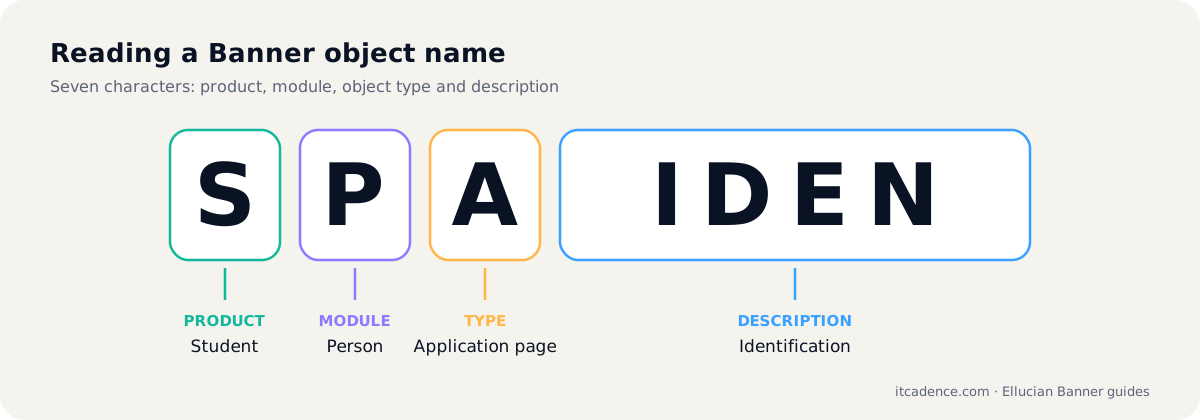
Most Banner object names have seven characters. The first letter is the product (S = Student, F = Finance, G = General, R = Financial Aid, T = Accounts Receivable, P/N = HR and Position Control, A = Advancement), the second is the module within that product, the third is the object type (A = application, I = inquiry, Q = query, V = validation, R = rule or repeating table, B = base table, P = process), and the last four letters describe the object.
Overview
Banner names are a compact code. Once you know the pattern, SPAIDEN, GJAPCTL and FGAJVCD stop looking random.
Position 1: the product
| Letter | Product |
|---|---|
| G | General |
| S | Student |
| T | Accounts Receivable |
| R | Financial Aid |
| F | Finance |
| P / N | HR and Payroll / Position Control |
| A | Advancement |
Position 2: the module
The second letter narrows it down within the product, for example in Student: F = registration, H = academic history, S = schedule, C = catalogue, A = admissions, G = general student.
Position 3: the object type
| Letter | Type | Example |
|---|---|---|
| A | Application (maintenance page) | SFAREGS |
| I | Inquiry | FGIBDST |
| Q | Query | Query-only pages |
| V | Validation | STVTERM |
| R | Rule page or repeating table | SFRSTCR |
| B | Base table | SGBSTDN |
| P | Process | SHRROLL |
Positions 4 to 7: the description
The last four letters describe the object: IDEN = identification, REGS = registration, PCTL = process control, JVCD = journal voucher.
A few decoded examples
- SFAREGS: Student, Registration, Application, REGiStration.
- GJAPCTL: General, Job submission, Application, Process ConTroL.
- FGAJVCD: Finance, General ledger, Application, Journal Voucher.
- STVTERM: Student, Validation, Term.
Exceptions exist, but this pattern lets you guess where an object belongs and what it does. See also our Banner glossary.
Frequently asked questions
S = Student, P = Person, A = Application form, IDEN = Identification. It is the general person identification page.
V marks a validation object such as STVTERM, which defines the list of valid values used elsewhere in Banner.
Last reviewed by the ITCadence Banner team. Ellucian product capabilities vary by version and licence; confirm details against current Ellucian documentation.